Blog & Best Practices
Insights, Guides, and Tips for Optimizing Your PelicanCorp Solutions
Industry News
Digitally Document Your Tickets
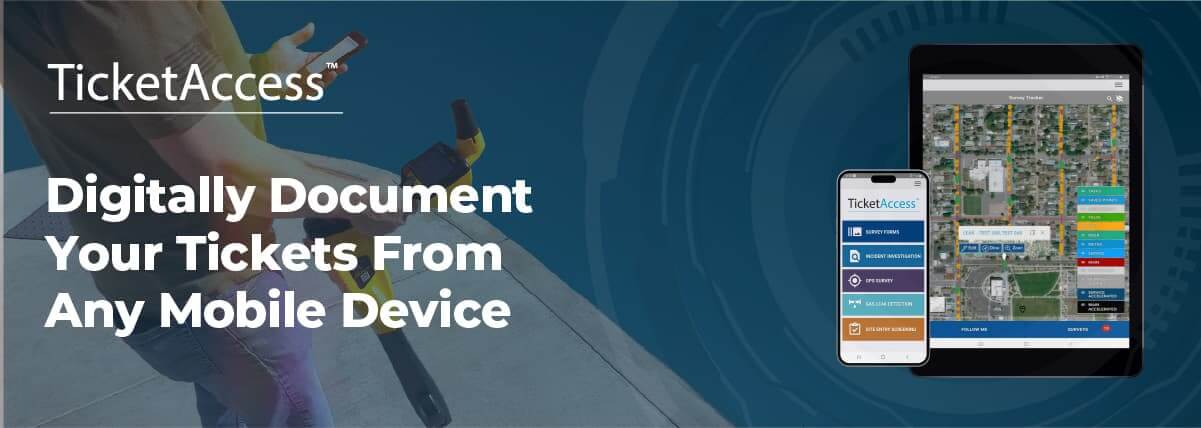
In today’s fast-paced world, the ability to capture and document data on the go is crucial for professionals who manage locate requests/tickets. Gone are the days when field workers had to rely on cumbersome paper-based forms or limited desktop access to document tickets and job reports. Now, with the right mobile tools, teams can digitally document tickets from any mobile device, streamlining workflows and enhancing the accuracy of their data.
The Power of Digital Documentation
Field workers and contractors can now collect a wealth of information with just a few taps on their mobile devices. From taking photos and videos of worksite conditions to adding digital map sketches and map notes, modern locate ticket management solutions empower teams to build rich, comprehensive reports in real time. The benefits are immediate:
- Increased accuracy: Mobile documentation allows workers to capture real-time evidence of job progress or issues, reducing the risk of miscommunication or data loss.
- Compliance at your fingertips: Adding compliance documentation directly to each ticket ensures that all required information is readily available for audits or reporting purposes.
Enhanced Multi-Media Documentation
The ability to sketch directly on photos or maps using a mobile device provides an extra layer of precision. Workers can draw attention to specific areas or conditions on the site, annotate images, and add detailed notes to provide clear instructions for future action. Additionally, adding GIS coordinates with timestamped data further enhances documentation, giving users location-based context that improves both safety and accountability.
Seamless Collaboration
By documenting tickets digitally, teams can collaborate seamlessly across locations. Data captured in the field is instantly accessible to managers, contractors, or compliance officers, reducing delays and speeding up decision-making. With multi-media documentation available at their fingertips, teams can respond faster to emergencies, inspections, or project updates, leading to more efficient project management.
Conclusion
Digital ticket documentation is revolutionizing how ticket management is performed in the field. The ability to capture detailed, real-time data via mobile devices improves accuracy, ensures compliance, and provides immediate status’ back to your OneCall provider. By embracing this digital transformation, businesses can streamline workflows, reduce operational risks, and stay ahead of the competition.
Interested in how digital documentation can transform your field operations? Reach out for a demo and see how these mobile solutions can enhance your team’s productivity.
Streamline Ticket Management with TicketAccess
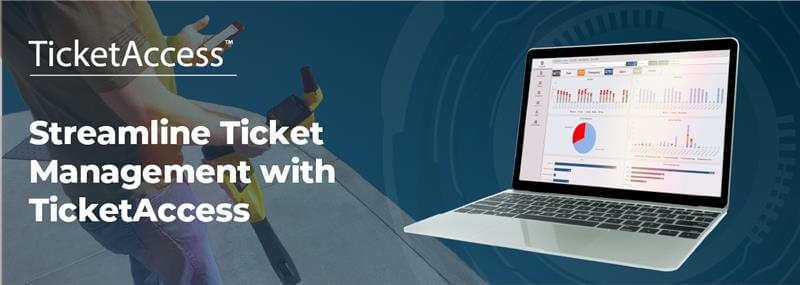
Managing utility locate requests can often be a complex and time-sensitive task. Whether you're handling excavation tickets, utility work orders, or any other operational processes, prioritizing and tracking requests is crucial to staying compliant and delivering on time. That's where TicketAccess comes in.
Prioritize and Categorize Tickets with Ease
TicketAccess takes the guesswork out of ticket management by automatically prioritizing and categorizing each request based on due dates, urgency, and other key factors. By centralizing all incoming tickets and ensuring they are organized by priority, your team can focus on the most pressing tasks without getting bogged down in manual tracking.
Due Date and Time Tracking
Staying on top of deadlines is critical in the utility and infrastructure sectors. With due date and time tracking, TicketAccess ensures you never miss a deadline again. The system tracks the progress of each locate ticket and provides real-time notifications and alerts when a deadline is approaching, allowing your team to act proactively and meet your compliance requirements.
Automated Workflows for Improved Efficiency
Manual workflows are time-consuming and prone to errors. TicketAccess automates key processes, creating a seamless workflow that reduces the chances of human error while improving the efficiency of your operations. Automated workflows ensure tasks move smoothly from one stage to the next, enabling teams to focus on what matters most—delivering timely and accurate locates.
Track On-Time Performance and Compliance
With TicketAccess, you can effortlessly monitor your on-time performance and compliance documentation, keeping every project on track and ensuring that all required paperwork is in place. This is essential for maintaining regulatory compliance and avoiding costly fines or delays.
Why TicketAccess is a Game Changer
- Priority Management: Automatically organizes and categorizes ticket requests, ensuring that urgent tasks are handled first.
- Time Tracking: Real-time alerts and tracking of due dates help avoid missing deadlines.
- Automation: Simplifies and speeds up workflows, boosting team productivity.
- Compliance Management: Ensures that all required documentation is handled accurately and on time, reducing compliance risks.
TicketAccess takes utility management to the next level by eliminating the manual burden of tracking and organizing requests, allowing you to focus on delivering exceptional service.
Interested in seeing how TicketAccess can streamline your utility management process? Reach out for a demo today!
Lower Your Operational Costs

Advanced Features for Managing Utility Workflows
Managing utility damages, dig requests, and regional operations can be challenging and time demanding, but TicketAccess provides the tools needed to simplify these processes and efficiently lower your costs. With per-ticket pricing, pay only for what you use while getting all the features of a modern, highly-configurable ticketing solution.
Here are a few areas where TicketAccess can transform your operations:
Dashboards for Insightful Oversight
Efficient ticket management is vital, and TicketAccess dashboards provide real-time monitoring of tickets, from active requests to project progress. Performance Insights help teams meet deadlines, balance workloads, and monitor ticket status, while Geographical Breakdown allows for a clear view of regional data to optimize resource allocation. Comprehensive KPI Monitoring further supports data-driven decisions, ensuring continuous improvement and efficiency.
Damage Investigation
Utility damage and near-miss incidents require accurate documentation and analysis. TicketAccess’ Damage Investigation module is designed to streamline this process, helping organizations easily record, analyze, and resolve incidents. This ensures all relevant details are captured for more effective prevention strategies in the future. With a simple button click, TicketAccess makes it easy for you to report damage investigation details to the Common Ground Alliance (CGA) Damage Information Reporting Tool (DIRT) database.
Configurable Platform
With its flexible configuration, TicketAccess flexes to meet your unique needs. From custom forms to adjustable dashboards, you determine the essential data to deliver to your team.
Managing operations across diverse regions? TicketAccess offers robust configuration features that enable you to customize how you receive tickets from various OneCall Services. With this flexibility, you can define criteria for screening tickets, using detailed parameters such as ticket attributes, spatial intersections, or proximity conditions. This ensures that your ticket management aligns precisely with regional needs and regulatory requirements, making your operations more efficient and tailored to specific geographical areas.
Seamless ArcGIS Integration
Handling dig requests and utility data becomes easier with TicketAccess’ integration with Esri® ArcGIS®. This integration offers detailed geospatial insights, allowing teams to visualize asset locations and prioritize dig requests based on proximity to critical infrastructure. Automated features like custom alerts and GIS-driven ticket grouping ensure timely responses and streamlined operations, enhancing coordination between field and office teams.
Ready to take your utility management to the next level? Request a demo of TicketAccess and see how our advanced features can make a difference!
Futureproof Your Operations with LocateAccess

Facility operators and utility owners are seeing the annual number of locate requests steadily climb each year. As a vital part of the damage prevention process, locate requests protect buried facilities and the lives of those that work around them. However, as the number of locates increases, asset owners increasingly find themselves struggling to keep up. Late or missed locate requests can cause a delay, damage, injury, or death. To get ahead of this problem facility owners are partnering with PelicanCorp, the global leader in damage prevention, and deploying LocateAccess to their workforce. LocateAccess is a next generation locate management tool designed to drive efficiency, reduce operating costs, and improve safety in the locate request process. Prepare your organization for the future of damage prevention by discovering more about the benefits of LocateAccess.
What is LocateAccess?
LocateAccess is a software solution that uses automation to improve every aspect of the locate request process for facility operators, utility owners, and contract locators. LocateAccess’ smart technology allows you to quickly receive, sort, modify and assign locate requests to the field. Field operators then use LocateAccess’s intuitive features to automatically route their locate assignments, evaluate GIS and facility data against the ticket, document the markout, close the request and send a positive response. In the office, LocateAccess serves as a single point of truth for the damage prevention process, providing detailed and insightful reporting.
LocateAccess can be deployed both as a stand-alone solution or as part of a comprehensive damage prevention suite that includes ScreenAccess and PermitAccess.
Benefits of LocateAccess
Streamlined Workflows Equal On-Time and Accurate Locates
LocateAccess allows you to leverage automation through customized workflows and real-time routing. This means less backlog, no late tickets, and no fines. LocateAccess allows you to create a customized workflow that considers workloads, staffing levels, number of tickets, ticket priorities, ticket types, facility type, geographic locations, and even traffic. What was a manual process that took your office staff hours now takes seconds. Getting locates to the field faster means more locates completed in a day. Once dispatched, LocateAccess allows your field staff to route their ticket list automatically by time or priority. This allows them to concentrate on accuracy and safety, all while getting more done.
GIS, Facility, and Ticket Data All on One Map
LocateAccess allows you to merge your GIS and ticket data, saving time in the field and office. When you view a locate request either in the office or the field you will be able to see your GIS, facility, and ticket data all in one place. Providing this data on a map allows staff to quickly determine the type and location of a buried asset, as well as whether that asset may be impacted by the proposed dig site. Fewer calls in the office or clicks into a separate system means quicker locates, and more visibility means higher accuracy.

No Signal, No Problem
With LocateAccess you can access your data anywhere, even when you are offline. As a web-based tool, PelicanCorp has designed LocateAccess to work in a disconnected mode allowing your staff to travel to remote areas without worrying about loss of access to ticket data and functions. When you come back into connectivity the system syncs and updates, saving you more time.
Greater Efficiency and Accident Reduction through GPS Tracking
LocateAccess allows you to follow your staff throughout the day with live GPS tracking. This allows you to problem-solve in real time and make routing and staffing decisions based on location and distance. It also allows a manager to ensure a safe and accident-free workplace.
Quick and Easy Locate Documentation
Accurate locate documentation protects your organization from liability in the event of damage or injury. Proving that your work was done correctly and on time is a necessary but often time-consuming task. With LocateAccess’ intuitive sketching and attachments tool your field staff can quickly diagram the site and add notes that will not only protect your organization but also provide excavators the additional information they need to dig safely. By using LocateAccess to also take pictures and video of the markout you can greatly reduce even more the time spent documenting the site.
Custom Reporting with Actionable Insights
LocateAccess is a single point of truth for your organization's damage prevention process. With easy-to-use and highly customizable reporting features you can leverage all your data to drive greater efficiency, uncover cost savings, and keep on top of yearly trends. If you prefer to manage your data elsewhere you can easily export the raw data in several formats.
Automation for the Future of Damage Prevention
In multiple reports the CGA (Common Ground Alliance) identified several trends that are challenging the sustainability of the current damage prevention model. Chief among them was the increasing volume of locate requests. By deploying the proven automation and efficiency of LocateAccess you can get ahead of these challenges and protect your facility into the future. Contact PelicanCorp today to get started.
Automated Screening for Better Accuracy
If you are a contractor working on an excavation project in the United States, the law requires you to dial the 811 number before digging begins. This ensures that you do not cause any damage to underground assets during excavation.
Any digging work, however big or small, must be notified to the One-Call notification center at least 48 to 72 hours before work commences. You can go ahead only if you get an all-clear signal from the authorities. How does this work though? Are there any challenges? Let's find out.
Case Example
Imagine you’re a building contractor in California responsible for erecting a warehouse. The land is ready and paperwork complete—except one final step: notifying the One-Call ticket center. It's their job to identify all utility companies operating in the area. Those utilities must confirm if any of their assets are present before you can dig.
Until these companies give the go-ahead, you cannot start your excavation.
Challenges with Conventional Methods
Despite laws prohibiting digging without clearance, excavators often rush work. Manual One-Call centers can take time to notify utilities, and contractors may assume there are no buried assets—both highly dangerous assumptions. Damaging a power line can black out entire neighborhoods. Hitting a gas pipeline can result in serious injury.
The Uniqueness of ScreenAccess
One-Call centers in the US process tens of millions of tickets each year, leading to delays with manual systems. To address this, PelicanCorp developed ScreenAccess—an automated screening solution that acts as an intelligent layer between One-Call requests and the ticket management system.
ScreenAccess uses advanced technology (a spatial and data engine) to automatically analyze incoming requests, identify nearby assets, and notify utilities. It generates maps indicating excavation plans and asset proximity, then sends automated responses tailored to the situation—warnings, permissions, or notices of planned blasting near critical assets.
Who Can Benefit from ScreenAccess?
ScreenAccess benefits both excavation contractors and utility providers. Contractors receive faster responses and clarity on asset locations, reducing project delays. Utilities save time and resources by automating identification and notification—reducing site visits and operational costs.
Industries such as telecommunications, electricity, gas, water, and sewage can better protect critical infrastructure, prevent accidents, reduce costs, and improve response times.
Takeaway
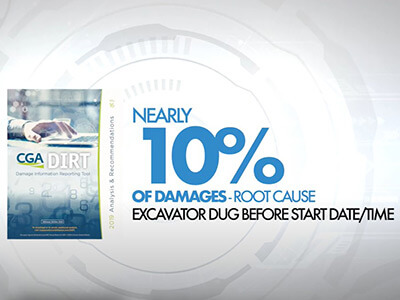
Despite laws requiring 811 notification, the cumbersome manual process tempts many to skip this critical step—leading to nearly 10% of utility damages from rushed excavations. ScreenAccess enables faster, automated responses to every locate request, reducing damage risks and operational costs while ensuring projects can begin on time with peace of mind for both contractors and utilities.
Change PermitAccess for Streamlined Approvals
Hear how one City improved visibility of street works and dramatically improved their permit response time from 10 business days to just 48 hours!
Challenges
- Asset protection department lacking visibility around works being done by contractors within the road reserve
- Manual, resource-intensive process for permit applications meant projects often commenced without the City's awareness
- Lack of notice by contractors of actual work being performed
- High road reinstatement costs due to undocumented works
- No integration with local 811 centers
With a road network of over 1,050 miles servicing 155,000 residents, the City of Mornington Peninsula was receiving over 800 One Call inquiries per month. As an existing PelicanCorp partner, they were already automating ticket screening and response with TicketAccess. To complete their automation revolution, they became the first City to implement PermitAccess.
Whether you manage a small regional shire or a large inner-city council, the road opening permit process is complex. Asset managers are expected to track permit applications, know who is working where and when, and manage the process efficiently and cost-effectively. With public works volumes increasing rapidly, it can feel unachievable with fewer resources than ever.
Solution
PermitAccess is an end-to-end cloud solution for applicants and authorities to apply for, review, and approve permits by combining and automating the One Call inquiry and permit application processes.
“When processing over 10,000 One Call tickets per annum, we knew we were missing many permit applications. While this affected revenue, our primary interest was awareness of works affecting council property,” said Cameron Cantley-Smith, Asset Protection Officer at Mornington Peninsula.
The manual process could take up to 10 working days to process permits. “After investigating PermitAccess with PelicanCorp, we realised automation would ensure all projects followed the correct procedure while saving time and resources,” Cameron explained.
He continued, “The PelicanCorp team worked with us to configure PermitAccess to suit our local permitting requirements. Contractors using the 811 service for asset plan locations now automatically have their permit applications delivered to us.”
“Our team can communicate with contractors, invoice them online, and send permits once payment is received. Contractors can then advise us of start and completion dates. This enables us to inspect and confirm the works were done to the City's satisfaction,” Cameron added.
Outcome
- Contractors can now access systems and information far more effectively, boosting productivity and efficiency
- Reduced average permit turnaround from 10 business days to as little as 48 hours
- Greater visibility across all works within the road reserve enables the City to address issues proactively, saving time and costs
“This gives contractors confidence to complete projects knowing they're up to our standards,” Cameron said. “PermitAccess also provides features not seen in manual systems, such as online payments, map views of applications, audit trails, and activity reporting.”
He concluded, “We’re incredibly positive and excited about the enhancements PermitAccess has brought to our organization. As part of our digital transformation, it’s vital we adopt technology that truly revolutionizes how we operate.”